Open-source identity and access managementDecide who gets in, to what, and for how long.
Halo is an identity provider you run yourself: passkey sign-in, single sign-on over OpenID Connect and SAML, conditional access and access reviews, released under Apache-2.0.
curl -fsSL https://halo.scala.gg/install.sh | shDocker Compose on any Linux host, amd64 or arm64. Read the script
Read the docsDiagram: Luna signs in with a passkey. Halo checks the sign-in method, her device, her groups and her risk, then signs her in to Grafana, Forgejo, AWS IAM Identity Center and Nextcloud, and refuses Kubernetes because no group of hers is assigned to it.
The console
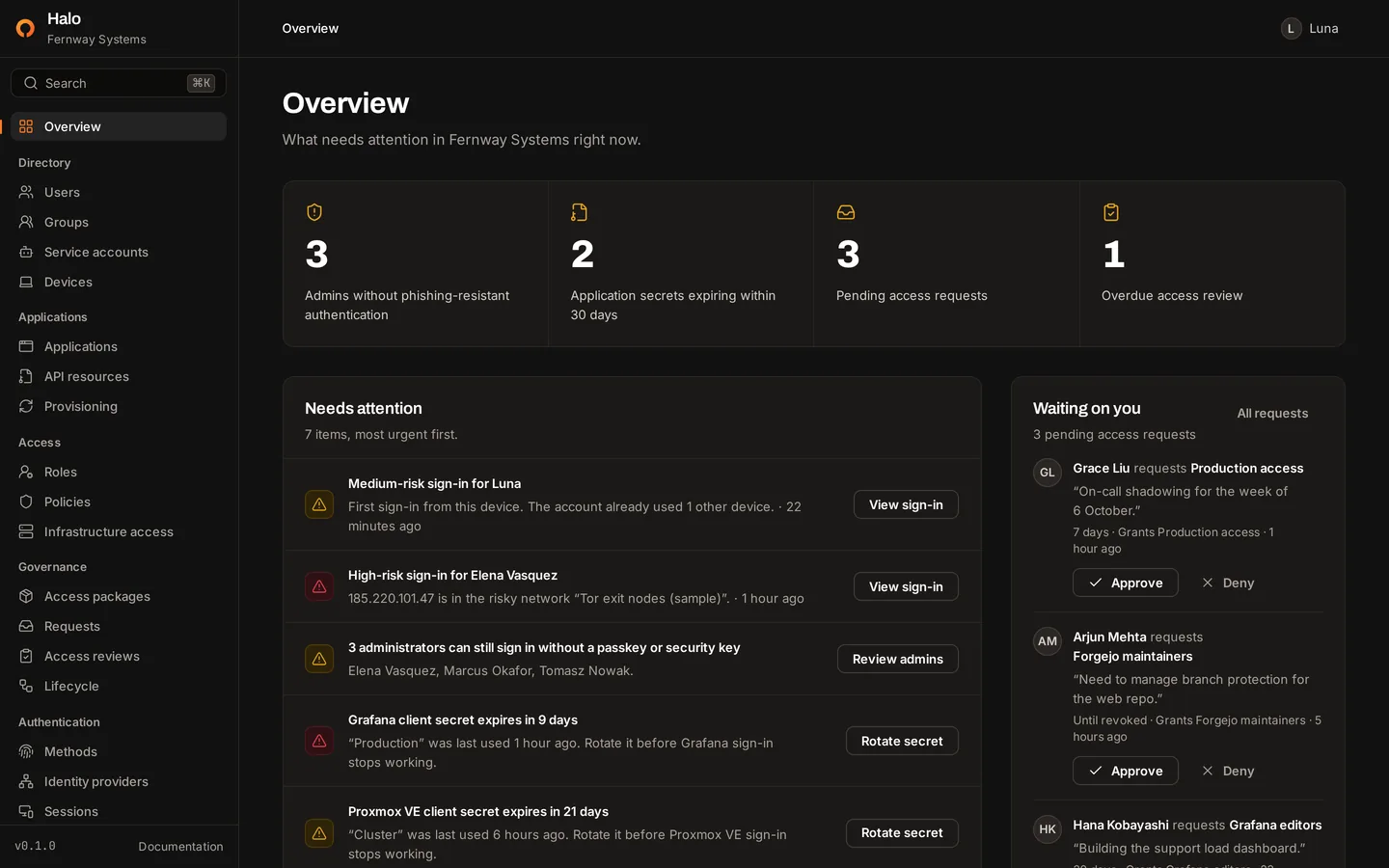
A console that starts with what needs attention.
Users, groups, applications, policies, governance and logs, in one administration console. The overview leads with what an administrator should act on today.
The console opens on what needs attention: administrators who can still sign in without a passkey, application secrets about to expire, requests waiting on you and reviews past due.
Sign-in
No passwords to phish, reuse or reset.
People sign in with a passkey or a security key: a fingerprint, a face, a screen lock or a hardware key such as a YubiKey. Halo has no password field and stores no passwords.
- Phishing-resistantA passkey only works on your Halo domain, so a lookalike site gets nothing it can replay.
- No username to typeDiscoverable credentials let people pick their account straight from the passkey prompt.
- Fallbacks you controlAuthenticator apps, recovery codes and email links can each be switched off.
- Existing accountsSign in through Google, Microsoft Entra ID, GitHub or any OpenID Connect provider.
Lost a phone? Add a second passkey or keep recovery codes, and an administrator can reset someone's sign-in methods and send a new setup link.
How sign-in worksAnimation: Luna chooses Continue with passkey, confirms with her fingerprint, and Halo signs her in with a phishing-resistant passkey.
Animation: registering Grafana in Halo. Choose OpenID Connect, enter the name and redirect URI, copy the client ID, client secret and issuer, then assign the Engineering group so its members can sign in.
Single sign-on
Connect an application in minutes.
Register the application, assign the groups that may use it, and paste the client ID, secret and issuer into its settings. Each application page includes a setup guide for that product.
Open standards
Built on standards, not lock-in.
Halo speaks the protocols your applications already support, so connecting one needs configuration, not a Halo SDK.
- OpenID ConnectCore 1.0 · Discovery 1.0Single sign-on for web, single-page and native applications, with ID tokens signed with RS256.
- OAuth 2.0RFC 6749 · 7636 · 8628Authorization code with PKCE, refresh tokens that rotate, client credentials and the device flow.
- SAML 2.0Web browser SSOIdentity provider for applications that only speak SAML, started by the app or by Halo.
- SCIM 2.0RFC 7643 · 7644Provisioning in both directions: from Okta, Entra ID or HR systems, and out to your applications.
- WebAuthnPasskeys · FIDO2Phishing-resistant sign-in with passkeys and security keys, without a username.
- TOTPRFC 6238Six-digit codes from authenticator apps, as a fallback you can switch off.
- Implemented on main. Halo has not been through OpenID Foundation certification yet.
{ "issuer": "https://auth.example.com", "authorization_endpoint": "https://auth.example.com/oauth2/authorize", "token_endpoint": "https://auth.example.com/oauth2/token", "userinfo_endpoint": "https://auth.example.com/oauth2/userinfo", "jwks_uri": "https://auth.example.com/oauth2/keys", "end_session_endpoint": "https://auth.example.com/oauth2/logout", "device_authorization_endpoint": "https://auth.example.com/oauth2/device_authorization", "introspection_endpoint": "https://auth.example.com/oauth2/introspect", "revocation_endpoint": "https://auth.example.com/oauth2/revoke", "response_types_supported": ["code"], "grant_types_supported": ["authorization_code", "refresh_token", "client_credentials", "urn:ietf:params:oauth:grant-type:device_code"], "scopes_supported": ["openid", "profile", "email", "offline_access", "groups"], "code_challenge_methods_supported": ["S256"], "id_token_signing_alg_values_supported": ["RS256"]}Halo's discovery document, as any OpenID Connect client reads it.
Access policies
Every sign-in is checked against your policies.
A policy combines who is signing in, to which application, from which network, on which device, at what risk and with which method. It allows the sign-in, blocks it, or asks for a passkey or security key.
Run a new policy in report-only mode first. Halo records what it would have done to real sign-ins, so you see the effect before anyone is locked out.
How Halo decides
Luna → AWS IAM Identity Center
- Method
- Passkey
- Device
- Trusted
- Network
- Office
- Risk
- None
- Block high-risk sign-insEnforcedNo match
- Require a passkey for administratorsEnforcedSatisfied
- Require a trusted device for productionReport-onlyNo match
Every matching policy is satisfied.
Animation: Luna requests the Kubernetes cluster admins package for two days. Priya Raman approves it, Luna is added to the group, and two days later Halo removes her automatically.
Governance
Access that ends on its own.
Instead of asking an administrator in chat, people request an access package from their account portal. An approver decides, the grant runs for a set number of days, and Halo removes it when time is up.
- 01JoinerRules add new people to the right groups.
- 02RequestPeople ask for an access package.
- 03ApproveAn approver decides, never the requester.
- 04ExpireThe grant ends after its set days.
- 05ReviewReviewers keep or remove each member.
- 06LeaverRules suspend accounts and revoke sessions.
Infrastructure access
SSH certificates that expire, not keys that linger.
halo login signs you in on the command line through your browser. halo ssh-cert then issues a certificate for the principals your groups map to, valid for eight hours by default.
Servers trust Halo's certificate authority once: download its public key and add one line to sshd_config.
$ halo login --server https://auth.example.comOpen https://auth.example.com/device?user_code=WDJB-MJHTand check that the page shows the code WDJB-MJHT.Waiting for you to approve the sign-in…Signed in to https://auth.example.com as Luna <luna@example.com>.$ halo ssh-certWrote certificate 1042 to /home/luna/.ssh/id_ed25519-cert.pub.Log in as ops, deploy until 5 October 17:41 CEST.$ ssh ops@db-1.internal
Self-hosting
Your identity provider, on your own servers.
Halo is one Go server, one Next.js web interface and PostgreSQL. No Redis, no message queue, and no external service to depend on.
- SMTP for email
- Webhooks
- SCIM to applications
- Google, Entra ID, GitHub
Install
curl -fsSL https://halo.scala.gg/install.sh | shAsks for your domain and organization name, generates the secrets and starts the four containers.
Requirements
A Linux host with Docker Engine and the Compose plugin, a domain pointing at it, and ports 80 and 443 open. In testing, the four containers used about 200 MB of memory at idle.
Operations
Back up the database and HALO_SECRET_KEY. Upgrades are a pull and a restart, and the key rotates with halo rotate-secret-key.
Integrations
Works with the tools you already run.
Anything that supports OpenID Connect or SAML 2.0 can sign in with Halo. These applications have step-by-step guides.
Security
Boring security, written down.
Identity is the front door to everything else, so Halo's security model is documented in full, including what isn't finished yet. Halo has not had an independent audit.
- Hashed
- Session tokens, client secrets, API keys and refresh tokens are stored only as SHA-256 hashes and compared in constant time.
- Sealed
- Signing keys, authenticator seeds, provider secrets and the SSH CA are encrypted with AES-256-GCM. The key can be rotated.
- Audited
- Every administrative change checks the actor's role and writes an audit event in the same database transaction.
- Same-origin
- Requests that change state must come from Halo's own pages. Cross-site requests are refused.
- HTTPS only
- Halo refuses to start on plain HTTP outside development, and session cookies are Secure, HttpOnly and SameSite=Lax.
- Disclosed
- Vulnerabilities are reported privately, with response targets written down in the security policy.
Open source
Built in the open.
All of Halo lives in one public repository under the Apache License 2.0. There is no closed edition and no license key: what you read is what you run.
- Source codeServer, console, deployment files and docs
- ContributingDevelopment setup, checks and code style
- IssuesReport a bug or propose a feature
- ChangelogWhat works on main today
On the roadmap
- A first tagged releasePlanned
- Halo Cloud, a hosted versionPlanned
- LDAP directory syncPlanned
- Pushing groups over outbound SCIMPlanned
Run Halo on your own infrastructure.
One command on a Linux host with Docker. Then create your administrator and register a passkey.
curl -fsSL https://halo.scala.gg/install.sh | sh